Faster Ordering
Customers order directly from the table without waiting for a menu or app download.
QR orders, reception orders, kitchen workflow, menu operations, payments, analytics and AI — connected in one restaurant platform.
Subscription only. 0% DineQube order commission. No customer app.
QR orders and reception orders flow into the same kitchen workflow.
1× Farmhouse Pizza
1× Paneer Power Bowl
2× Farmhouse Pizza
1× Iced Tea
Butter Chicken • 2 Naan
Margherita • Cold Coffee
Family meal • 4 items
Cash / Card at table requested
Customer requested assistance
DineQube connects ordering, service, kitchen workflow, payments, menu operations and restaurant insights so teams spend less time coordinating repetitive steps.
Customers order directly from the table without waiting for a menu or app download.
Orders reach the restaurant dashboard instantly with table context and live status.
Manage menu, orders, kitchen flow, service requests and restaurant activity from one place.
DineQube does not take a commission on DineQube restaurant orders. External payment-provider fees may still apply.
Pro adds practical AI tools that reduce repetitive restaurant work.
Takeaway today, with online ordering, delivery and more automation being built next.
A simple customer journey connected directly to the restaurant operation.
Customer scans the table QR.
Customer browses the digital menu and places the order.
The restaurant receives and manages orders in real time.
Kitchen prepares, staff serves, and DineQube keeps everything connected.
Your customer menu is built around the actual dining session: discover dishes, view photos and descriptions, add items, checkout without an account and track the same table order live.
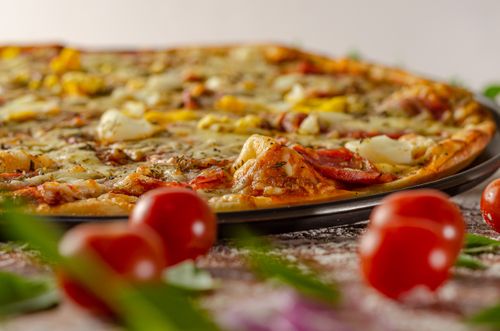
Stone-baked pizza with mozzarella, capsicum, onion, tomato and house herbs.
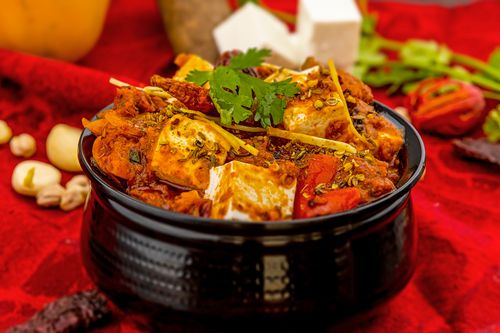
Grilled paneer tikka, herbed rice, greens, onion and mint-coriander dressing.
Chilled coffee with milk, ice and a smooth creamy finish.
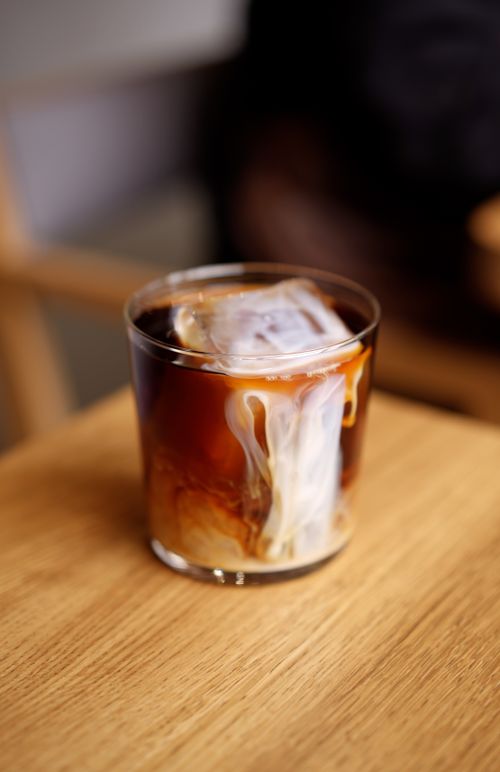
Table 08 order was sent successfully.
Kitchen is preparing your food now.
You’ll see the next update here.
Enjoy your meal.
Farmhouse Pizza × 1₹349Paneer Tikka Bowl × 1₹279
It just appeared in the restaurant dashboard.
Instead of scattered information, DineQube gives the restaurant a Live Dashboard for new, preparing and ready orders, service and payment requests, pending bills, menu control, table QR management, invoices, ratings and performance visibility.
Today’s sales, live order flow and service/payment requests in one operating view.
Farmhouse Pizza
Paneer Power Bowl
2× Paneer Bowl
1× Lime Soda
4 items • 12 min
Ready to serve
Cash / Card at table
Pay at reception • verify payment
Customer requested waiter
Staff can create an order from the restaurant's live DineQube menu at reception. The order is marked as manual, starts directly in Preparing and follows the same KOT, Ready, billing and order-history flow.
QR orders, reception orders, customer updates, kitchen operations, payments, analytics and AI — organized in one operating layer.
Let guests order from the table, let staff create reception orders, and keep both flows inside the same restaurant system.
Keep orders, kitchen stages, service requests and payment status visible to the restaurant team.
See sales, order movement and performance patterns without jumping between disconnected tools.
Use AI for menu creation and operational alerts while your team keeps final control.
Customers can follow the live order journey in the browser and receive configured email or WhatsApp updates using the contact details collected with the order.
Pay for the software plan you choose — not a percentage of every restaurant order. DineQube is built as your restaurant operations software, not as a marketplace taking a cut from your sales.
Use AI to turn an existing menu into a structured digital draft, improve descriptions and announce incoming orders — without taking control away from the restaurant.
AI will create a clear restaurant-ready description here.
Dal Makhani₹279DineQube AI reads your existing menu, organizes categories, captures prices and prepares useful descriptions for review before anything goes live.
Help restaurant teams notice new table orders, add-ons and takeaway orders faster.
Turn order and restaurant activity into useful operating signals instead of scattered information.
Menu drafts remain reviewable before publishing so the restaurant stays in control of what customers see.
DineQube guides the restaurant through profile, menu, tables, preview and launch so setup stays clear from the first step.
Create the restaurant account, bring in the menu, generate table QR codes, preview the customer experience and go live when the setup is ready.
Add the basic restaurant details that will appear across the manager workspace and customer menu.
Upload a JPG, PNG, WEBP or PDF. DineQube can extract a draft for the manager to review before publishing.
Generate table identities and QR codes. Each QR keeps the order tied to the correct table.
Preview the customer menu, test a table order and then switch the restaurant live when everything looks right.
Start with 14 days of Pro access. After the trial, choose Basic at ₹1,499/month or Pro at ₹2,499/month.
Special commercial offers may be available for selected restaurants and multi-location groups. Contact the DineQube team for details.
Contact UsSet up the restaurant, go live and use current DineQube Pro features free for 14 days. No credit card required.